Outdoor smart plugs bring voice-controlled convenience to yards, patios, and gardens, turning landscape lighting, fountains, holiday decorations, and power tools on or off without stepping outside. When paired with Google Home, these weatherproof devices respond to voice commands, schedules, and automation routines through the Google Home app. But not all outdoor smart plugs work seamlessly with Google Assistant, and choosing one that’s genuinely weather-resistant (not just splash-proof) makes the difference between a reliable setup and a fried circuit board after the first storm. This guide walks through selecting, installing, and troubleshooting outdoor smart plugs designed to work with Google Home ecosystems.
Table of Contents
ToggleKey Takeaways
- An outdoor smart plug Google Home setup requires a minimum IP44 weather rating but IP65 or higher ensures true durability through rain, snow, and temperature extremes.
- Voice control integration with Google Home works best with Wi-Fi-connected models that support the Matter protocol, avoiding the need for extra hubs and ensuring cross-platform compatibility.
- Outdoor smart plugs simplify landscape lighting, holiday decorations, fountains, and power tool management through voice commands and automated schedules without rewiring or installing new switches.
- Setup requires a strong 2.4 GHz Wi-Fi network connection and proper GFCI-protected outlets; weak signal strength and firmware updates are the most common troubleshooting issues.
- Avoid using outdoor smart plugs with high-wattage appliances, refrigerators, freezers, or equipment that shouldn’t power-cycle unexpectedly for safety reasons.
What Is an Outdoor Smart Plug and Why Use It with Google Home?
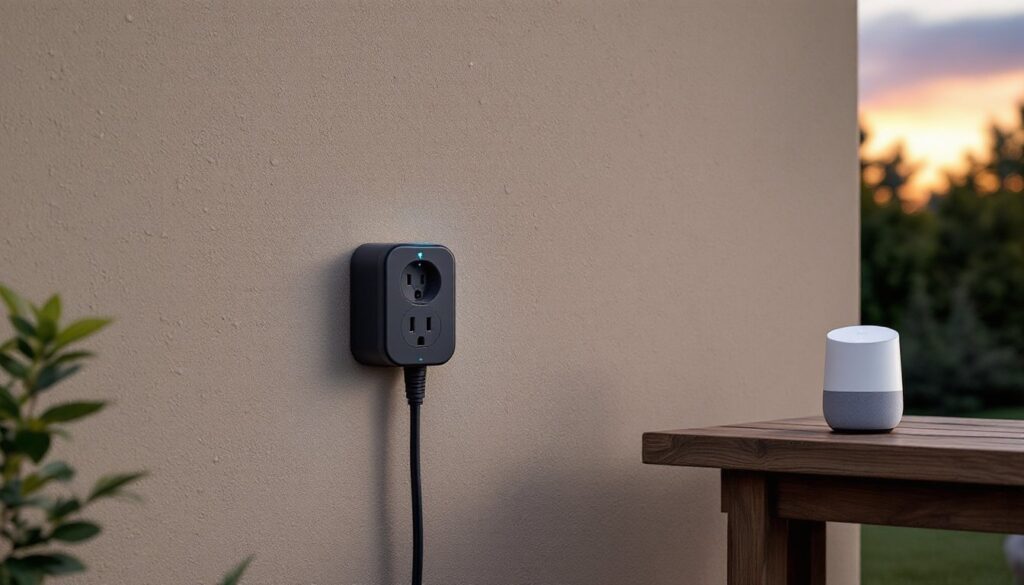
An outdoor smart plug is a Wi-Fi or hub-connected outlet adapter enclosed in a weatherproof housing rated for exterior use. It plugs into a standard outdoor GFCI receptacle and provides one or more controllable outlets that respond to app commands, voice instructions, or scheduled timers. Unlike indoor smart plugs, outdoor models feature sealed enclosures with gaskets, UV-resistant plastic, and drainage channels to withstand rain, snow, humidity, and temperature swings.
Integrating one with Google Home allows homeowners to control connected devices using voice commands through Google Assistant-enabled speakers, displays, or the Google Home app. Someone can say, “Hey Google, turn on the patio lights,” without fumbling for a wall switch or walking outside in the dark. Google Home integration also enables automation: lights that turn on at sunset, fountains that run on weekday mornings, or holiday decorations that follow a schedule without manual input.
Outdoor smart plugs make sense for seasonal equipment (inflatable decorations, electric grills, pool pumps), landscape lighting, irrigation timers, and holiday displays. They eliminate the need for mechanical timers, reduce energy waste from devices left running, and provide remote control when traveling. Google Home compatibility specifically appeals to users already invested in the Google ecosystem with Nest speakers, Chromecast devices, or Nest thermostats.
Key Features to Look for in Google Home-Compatible Outdoor Smart Plugs
Choosing the right outdoor smart plug requires attention to weather ratings, connectivity standards, and integration quality. Not every “smart plug” marketed as outdoor-ready will survive a Midwest winter or a Gulf Coast hurricane season.
Weather Resistance and Durability Ratings
IP ratings (Ingress Protection) indicate a device’s resistance to solids and liquids. For true outdoor use, look for a minimum rating of IP44 (splash-resistant) but preferably IP65 or higher (full dust protection and resistance to water jets from any direction). An IP65-rated plug handles rain, sprinklers, and hose spray but won’t survive submersion. If the plug sits in a low area prone to pooling water, consider an IP66 or IP67 model.
Housing materials matter. UV-stabilized polycarbonate or ABS plastic resists sun degradation that makes cheap plastics brittle within a season. Metal components should be corrosion-resistant (stainless steel or coated brass). Gasket seals around plug prongs and outlet receptacles prevent moisture intrusion: silicone or EPDM rubber gaskets outlast cheaper foam seals.
Operating temperature ranges vary. Most outdoor plugs handle -4°F to 122°F (-20°C to 50°C), but units marketed for extreme climates may tolerate -40°F starts or desert heat above 130°F. Check whether the plug includes built-in overcurrent protection (15-amp circuits are standard for outdoor receptacles) and GFCI-compatible operation since most outdoor outlets already have GFCI protection.
Voice Control and Smart Assistant Integration
Google Home compatibility isn’t universal. Verify the plug explicitly supports Google Assistant and can be added through the Google Home app, not just a third-party app with a separate voice assistant. Some plugs require a separate hub (Zigbee or Z-Wave), which adds cost and complexity: Wi-Fi models connect directly to a home network and integrate faster.
Matter protocol support is increasingly important. Matter is a unified smart home standard that ensures cross-platform compatibility between Google Home, Amazon Alexa, Apple HomeKit, and Samsung SmartThings. Plugs with Matter certification future-proof the setup as the standard matures through 2026 and beyond.
Check for dual or individual outlet control. Some outdoor plugs offer two receptacles but control them as a single unit: others allow independent scheduling for each outlet. Individual control matters when running a timer-based fountain on one outlet and always-available landscape lighting on the other.
Look for energy monitoring if tracking power consumption matters. This feature reports wattage and runtime through the app, useful for diagnosing power-hungry devices or estimating operating costs.
How to Set Up Your Outdoor Smart Plug with Google Home
Setup begins before plugging anything in. Confirm the outdoor receptacle is GFCI-protected and functioning (press the test and reset buttons). If the outlet lacks GFCI protection, have a licensed electrician install one, most jurisdictions require GFCI on outdoor circuits per the National Electrical Code (NEC Article 210.8).
Step-by-step installation:
- Download the manufacturer’s app (check the product packaging or manual). Most outdoor smart plugs require initial setup through a brand-specific app before Google Home integration.
- Create an account in the manufacturer’s app and ensure the smartphone is connected to the home’s 2.4 GHz Wi-Fi network. Most smart plugs don’t support 5 GHz bands: dual-band routers should have 2.4 GHz enabled and broadcasting.
- Plug the smart plug into the outdoor receptacle with the cover closed over it (weatherproof covers have spring-loaded or hinged lids with cutouts for plug cords). If the cover doesn’t accommodate the plug’s bulk, replace it with a “while-in-use” cover (a deep bubble cover that encloses plugs while in use).
- Put the plug in pairing mode. This usually involves holding a button on the device for 3-10 seconds until an LED blinks rapidly. Consult the manual for the exact button sequence.
- Add the device in the app. Follow the in-app prompts to connect the plug to Wi-Fi. The plug will confirm connection with a solid LED or chime.
- Name the device descriptively (“Front Yard Lights,” “Patio Fountain”) in the manufacturer’s app.
- Link to Google Home: Open the Google Home app, tap + (Add), then Set up device > Works with Google. Search for the plug manufacturer (e.g., TP-Link Kasa, Wyze, Govee). Log in with the credentials from step 2. The app will import all devices from that account.
- Assign the plug to a room in Google Home (“Backyard,” “Patio”) for easier voice control and grouping with other smart devices.
- Test voice commands: Say, “Hey Google, turn on [device name].” Adjust the device name in Google Home if it’s awkward to say aloud.
Troubleshooting during setup: If the plug won’t connect, move the router closer temporarily or add a Wi-Fi extender if the outdoor location has weak signal (many garages and far corners of yards fall into dead zones). Ensure the plug firmware is updated through the manufacturer’s app before linking to Google Home, outdated firmware causes integration failures.
Best Uses for Outdoor Smart Plugs in Your Home
Outdoor smart plugs solve repetitive tasks and add convenience where running new wiring or installing smart switches isn’t practical.
Landscape and pathway lighting: Set low-voltage LED landscape lights to turn on at sunset and off at sunrise using Google Home routines or the plug’s scheduling feature. Voice control allows override when hosting evening gatherings or when returning home late.
Holiday decorations: Schedule Christmas lights, inflatables, or Halloween displays to run only during evening hours, cutting energy costs and extending bulb life. Disable them remotely when traveling or after the season ends without crawling under bushes to unplug cords.
Water features and pond pumps: Control fountains, waterfalls, or koi pond aerators on schedules that match when the yard is in use. Running a fountain only during waking hours reduces pump wear and noise complaints from neighbors.
Electric grills and outdoor heaters: Turn on a patio heater 15 minutes before stepping outside or preheat an electric smoker from inside the house. Shut down equipment remotely if someone forgets to unplug it after use. (Safety note: Never use smart plugs with high-wattage gas igniters or appliances that create a fire risk if turned on unattended.)
Power tools and workshop equipment: Control dust collectors, shop vacuacs, or battery charging stations in detached garages or sheds. Voice-activate a workspace fan or task lighting without navigating a dark garage to find a switch.
Sprinkler and irrigation systems: Supplement or replace basic irrigation timers with smart control. Cancel watering routines remotely when rain is forecasted or extend cycles during heat waves.
Security and deterrence: Randomize exterior lighting patterns when away from home to simulate occupancy. Combine with motion sensors in Google Home routines for lights that respond to driveway activity.
Avoid using outdoor smart plugs with appliances that shouldn’t power-cycle unexpectedly (refrigerators, freezers, medical equipment) or those requiring more than 15 amps continuous draw.
Troubleshooting Common Google Home Connection Issues
When an outdoor smart plug drops offline or stops responding to voice commands, the issue usually falls into one of several categories.
Wi-Fi signal strength: Outdoor locations often sit at the edge of router range. Check signal strength in the Google Home app under the device settings. If the plug reports weak or fluctuating signal, reposition the router, add a mesh node or outdoor-rated Wi-Fi extender, or upgrade to a router with better range. Metal siding, brick, and stucco walls attenuate signals more than wood framing.
2.4 GHz vs. 5 GHz confusion: If the network uses the same SSID for both bands, the plug may try to connect to 5 GHz and fail. Temporarily disable the 5 GHz band, reconnect the plug, then re-enable it. Alternatively, create separate SSIDs for each band and connect the plug explicitly to 2.4 GHz.
Firmware and app updates: Manufacturers push firmware updates that fix bugs or improve Google Home integration. Check the manufacturer’s app for pending updates and install them. Update the Google Home app itself through the iOS App Store or Google Play Store.
Google Home re-linking: If the plug appears in the manufacturer’s app but not in Google Home, unlink and relink the service. In Google Home, tap the device, go to settings (gear icon), scroll to Linked services, find the manufacturer, and tap Unlink. Then re-add it through Set up device > Works with Google.
GFCI tripping: If the outdoor outlet’s GFCI trips repeatedly, the plug or connected device may have a ground fault. Test with a different device. Persistent tripping indicates a wiring issue, contact a licensed electrician. GFCI outlets are sensitive: even minor moisture intrusion or a damaged plug prong can cause nuisance trips.
Device renamed or moved: If Google Assistant says it “can’t reach [device name],” the device may have been renamed or removed in the manufacturer’s app without syncing to Google Home. Open Google Home, refresh linked devices, or re-run the device discovery process.
Router firewall or network isolation: Some routers isolate IoT devices on a guest network or block device-to-device communication. Ensure the plug and Google Home devices (speakers, displays) are on the same network segment and that multicast DNS (mDNS) and UPnP are enabled in router settings.
If persistent issues arise after exhausting these steps, reset the plug to factory settings (usually a 10-second button hold) and run through the setup process again from scratch. Contact the manufacturer’s support if the problem persists: some plugs have hardware defects or compatibility issues with specific router models that require replacement or firmware patches.